How Kubernetes Creates a Pod
Overview
- Learn the process Kubernetes goes through to create a Pod when you apply a manifest.
Introduction
In this blog post, we will discuss the process that Kubernetes goes through to create a Pod. Kubernetes is made up of a number of components, and we will see how these various components coordinate with each other to deploy various manifests. A Pod is a group of containers and is the smallest unit that Kubernetes administers. Kubernetes manages Pods, not containers. Pods live on nodes, nodes live on machines.
Pods are defined by a Pod manifest, here is a small example of a manifest:
apiVersion: v1
kind: Pod
metadata:
  name: nginx
spec:
  containers:
    - name: nginx
      image: nginx:latest
      ports:
        - containerPort: 80
We can apply this manifest with the command:
kubectl apply -f simple-pod.yaml
Let’s see the process Kubernetes goes through to create a Pod when you apply a manifest.
How Kubernetes Creates A Pod
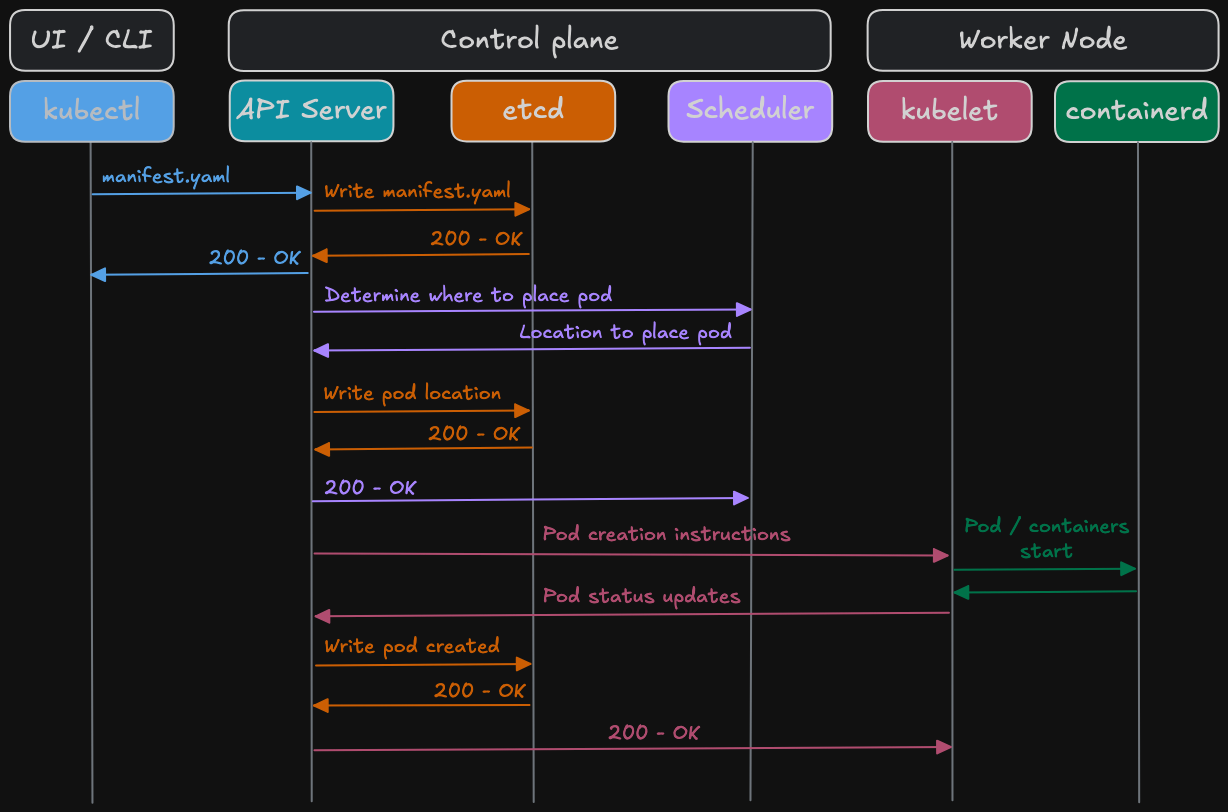
1. Kubectl sends manifest to API Server.
Kubectl takes the manifest we create, which details how to create the Pod, and sends this to the API server.
The API server talks to all the components in the Kubernetes cluster (kubelet, nodes, etcd). All the operations on Pods are executed by talking to the API server.
2. The API server writes the manifest to etcd.
etcd is one of the fundamental components of Kubernetes and operates as the primary key-value store for creating an operational, fault-tolerant Kubernetes cluster. The Kubernetes API server stores each cluster’s state data in etcd.
3. The API server sends OK back to kubectl.
! The Pod is not created yet !
The important information to know at this point is that the Pod is not created yet. If you run the command:
$ kubectl get pod
NAME    READY   STATUS    RESTARTS   AGE
nginx   0/1     Pending   0          8s
The READY column shows 0/1 ready (no containers ready yet) and the STATUS column shows that the Pod is in the Pending state. The pending state indicates that the Pod has been acknowledged by the Kubernetes cluster, but no containers have been set up and made ready to run. This includes time a Pod spends waiting to be scheduled, as well as the time spent downloading container images over the network.
4. The API server needs to know where the Pod needs to go so it asks the scheduler.
The scheduler watches the workloads on nodes and assigns loads on newly created Pods. It essentially plays “Tetris” on all nodes, trying to find the best fit for a Pod.
5. The scheduler decides which node we can put the Pod on and sends the information back to the API server.
Once a Pod is placed on a node, the schedulers work is done.
6. The API server updates this information in etcd.
7. The API server then sends OK to the scheduler to say everything looks good.
8. The API server sends the Pod creation instructions to kubelet on the worker node.
The API server reaches out to kubelet on the worker node where the scheduler decided to create the Pod.
Kubelet is the main agent that runs on each node in a Kubernetes cluster, responsible for ensuring that containers described in a PodSpec are running and healthy. It communicates with the control plane to receive instructions, monitors the status of Pods and containers on its node, and interacts with the container runtime to manage the life cycle of Pods and containers.
At this point kubelet runs all the necessary commands, such as Docker pull, run, etc…
! It is at this moment both the Pod and containers are actually created !
Kubelet is also responsible for creating the Pod that the container is put in. The Pod is made first, then the container is made and placed inside it. As the Pod and container are being created, it feeds status updates back to the API server.
9. Once the Pod is created, the API server writes this information to etcd.
10. The API server sends OK to kubelet.
If we now run the command:
$ kubectl get pod
NAME    READY   STATUS    RESTARTS   AGE
nginx   1/1     Running   0          40s
The READY column shows 1/1 (one Pod and container up) and the STATUS column shows that the Pod is in the Running state. The running state indicates that the Pod has been attached to a node and all of the containers have been created.
Summary
We have seen the process that Kubernetes goes through when creating a Pod. When we run the kubectl command, it triggers a lot of asynchronous communication between the components on the control plane and worker nodes. This type of communication happens for all Kubernetes object types (Namespace, Deployment, StatefulSet, etc…) not just Pods. Kubernetes also performs a similar dance when a user updates a Pod (for example, adding a new container to a Pods manifest) or when a user deletes a Pod.
It is also worth mentioning that although there is some overlap, we have been talking here about Pod creation, not lifecycles. A Pod during its lifetime can go through various lifecycle states, such as pending, running, failed, unknown, etc… And all this is coordinated via the control plane and worker nodes within a Kubernetes cluster.
Thank you for reading.